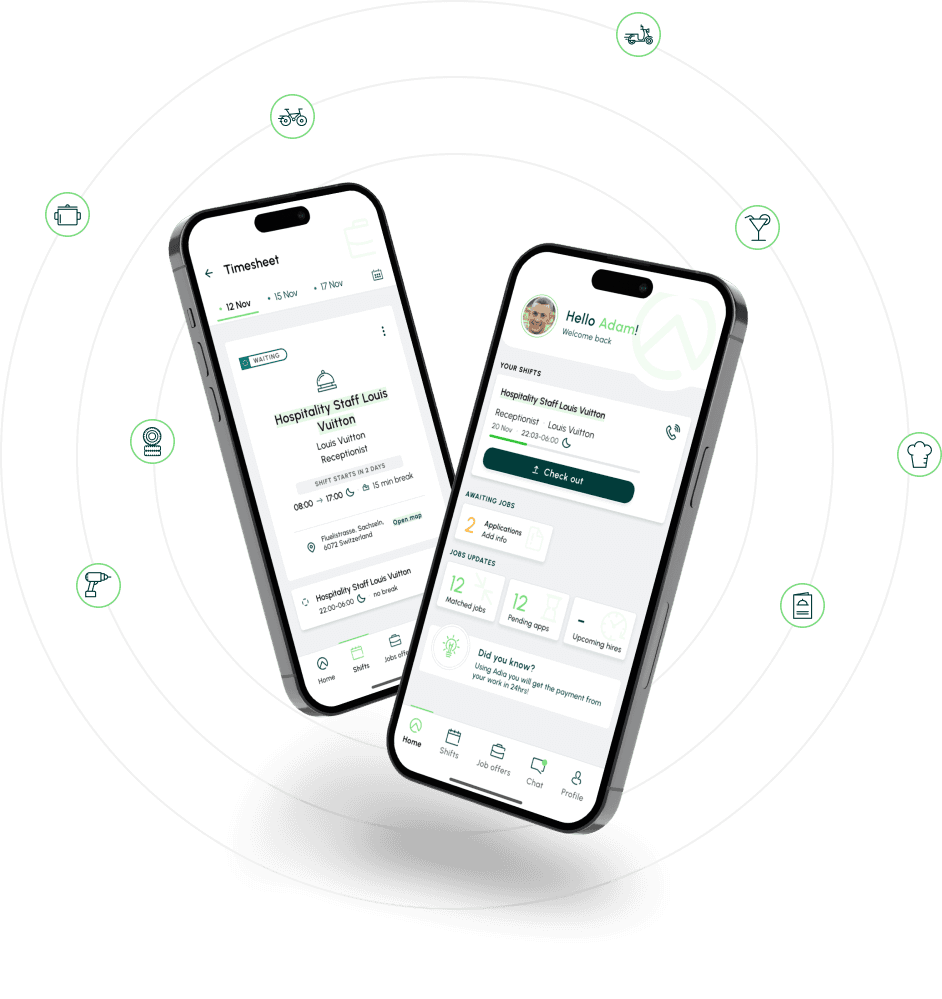
Adia is a Swiss platform connecting thousands of temporary workers with job opportunities. With their mobile app engine (Microsoft Xamarin) expiring in 12 months, the company needed more than a tech migration — it was a chance to fix real usability problems that had been frustrating users for years.
Over 10 months, I redesigned the full candidate experience: from job discovery through application to contract signing. The app is now live.
Category:
Android/IOS app
Client:
Adia
Domain:
HR
Duration:
10 months
Actions
Inspiration board
Prioritizing workshops
Cross-platform mobile design
Figma prototyping
Design system
[PROJECT NEED]
Adia, a trusted platform for temporary job seekers in Switzerland, has connected thousands of users with opportunities over the past few years.
However, as trends and technology evolve, so must the platform. With the current mobile application engine (Microsoft Xamarin) set to expire in 12 months, Adia saw this as a chance to redefine itself.
Target users
Their task
Find and secure temporary job opportunities that align with their preferences, skills, and availability
[MY ROLE]
Sole UX designer working closely with a business analyst and product owner. I owned the full design process: user interviews, UX audit, information architecture, wireframing, prototyping in Figma, UI design, design system, and corridor testing
Adia faced challenges redesigning their old software
Adia needed to refresh its slightly outdated software to ensure continuous support and robust data security for its clients. Taking advantage of the opportunity, they also wanted to refresh their app's design to better meet the needs of their users.
Struggling to tackle this overhaul with other companies before, they partnered with us to guide the transformation and achieve their vision.
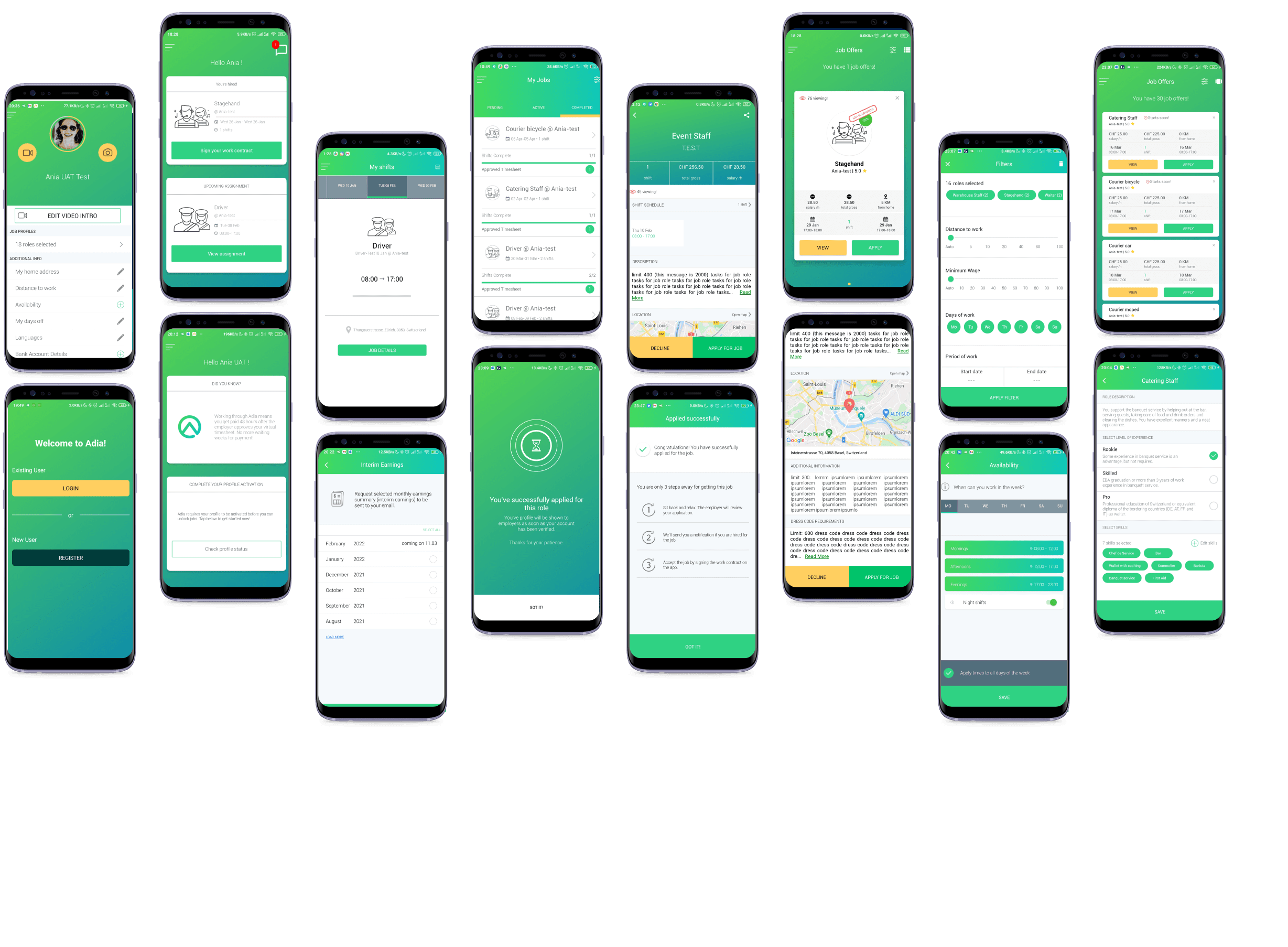
Adia - previous app designs
[WHAT MADE ADIA OUTDATED]
Here’s a quick look at the key challenges we’ve identified and the opportunities we’ve had to improve, thanks to input from users, stakeholders, and a UX audit.
While applying for an offer, users often became confused about the job status
Many job seekers didn’t realize they needed to sign the offer before showing up for the job because it already appeared in the 'My Jobs' section.
On the other hand, some assumed that not signing the contract meant there would be no consequences for not showing up, which posed a significant challenge from a business perspective.
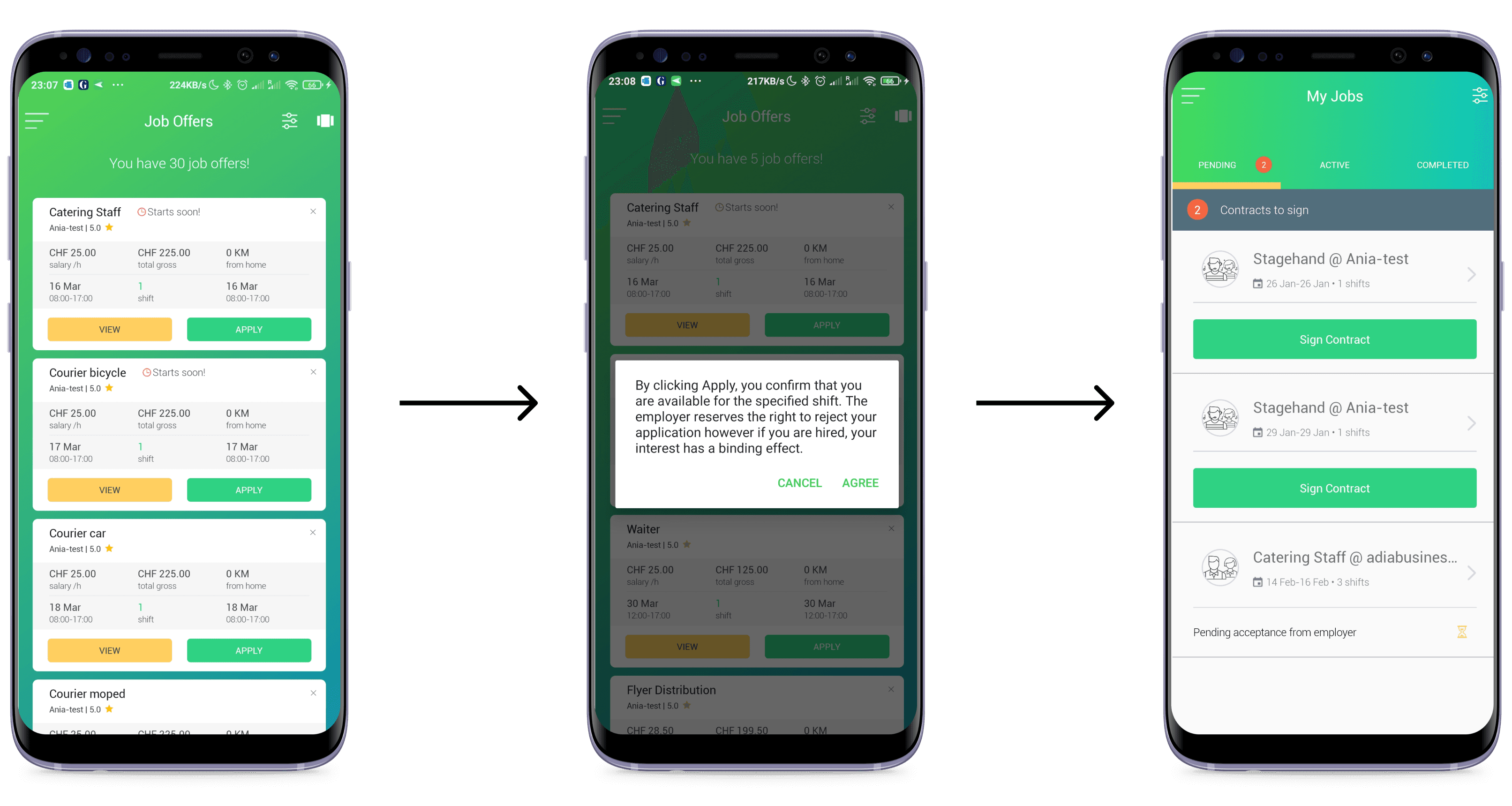

Previous app: Applying for the job offers flow
Through conversations with users of the previous app version and
a UX audit, I identified three core problems:
Overly complex wording on the job-applying confirmation pop up
Users often feel frustrated by dead ends
Users frequently encounter frustration during the process of applying for an offer or updating the job status due to numerous dead ends in the interface.
These moments leave them unsure about what steps
to take next or how to resolve issues, creating unnecessary friction and hindering their overall experience.
A lack of clear directional prompts in the UI
Diving deep into UI
A UX audit revealed several key issues impacting the user interface.
Accessibility concerns, such as insufficient color contrast and unclear labels, create confusion and hinder navigation. Inconsistent visual hierarchy makes it difficult for users to prioritize actions, while the outdated design reduces trust and engagement.
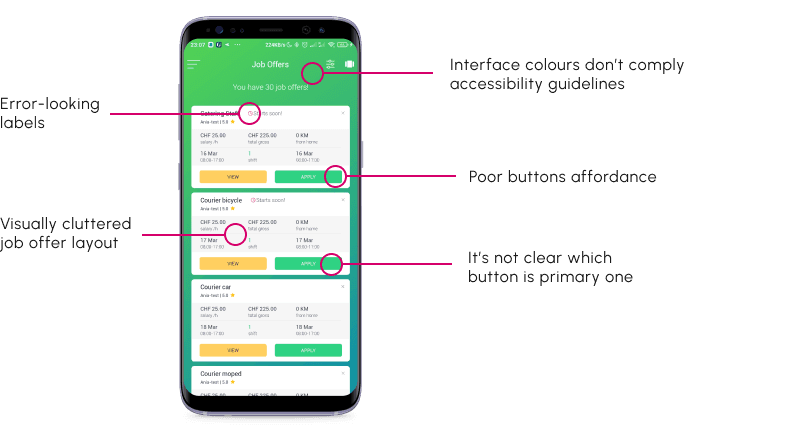
Previous app: Issues in the UI, as seen in the job offers example.
[REBIRTH OF ADIA CANDIDATE APP]
After nine months of intense workshopping and countless design discussions, the Adia app emerged with a completely transformed look and feel — a fresh, innovative experience that redefines how users interact with the platform
First, the design foundation
We started with Material Design for speed — predefined guidelines meant faster delivery and confidence in the 12-month deadline.
But during a workshop where I presented the implications of both paths, the client chose to invest in a custom design system. The trade-off was clear: more time upfront, but a unique brand identity and full control over user flows. That decision shaped the remaining 8 months of the project.
Material Designs first attempts compared with the final design direction
[MATERIAL DESIGN]
Quick implementation with the reliable design system
Confidence in delivering a fully functional application within 12 months
[TAILORED DESIGN SYSTEM]
Unique brand identity building a competitive position in the market
Allows customisation for the design and user paths
Secondly, the skeleton
Knowing the current architecture of the application isn't efficient enough, we checked the existing system's limitations and conducted internal workshops with the client's team. Together with the domain experts, I collaboratively worked out the most sensible solution tailored to their needs.
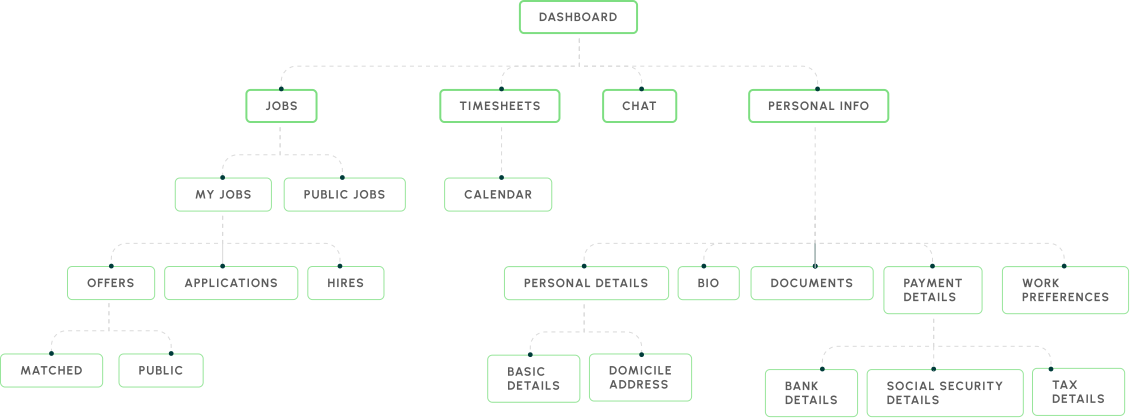
New app information architecture
Rethinking job status communication
The product owner's original flow didn't emphasize document signing and legal responsibility strongly enough. I had concerns — and corridor tests confirmed them: users were missing critical legal steps because the status names and navigation didn't communicate urgency. I redesigned the status labels and navigation flow to make contract signing impossible to overlook. This was a moment where testing a quick assumption prevented a serious post-launch problem.
Applied jobs got their separate section
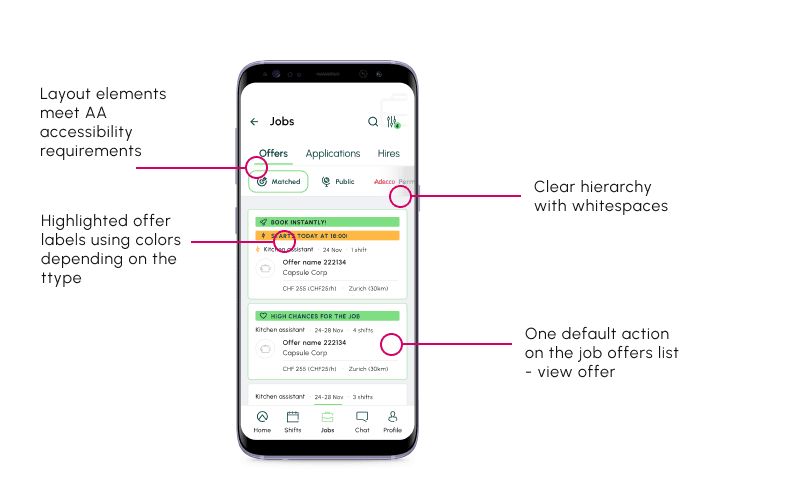
Lastly, the other improvements
Knowing the current architecture of the application isn't efficient enough, we checked the existing system's limitations and conducted internal workshops with the client's team. Together with the domain experts, we collaboratively worked out the most sensible solution tailored to their needs.
[CONCLUSION]
So what did we achieve?
A live product
The redesigned Adia app shipped on both iOS and Android, replacing the legacy Xamarin app before the deadline.
Safer user flows
Redesigned status communication and contract signing flow reduced the risk of unsigned contracts and no-shows — a direct business impact validated through corridor testing before launch.
A custom design system
Built from scratch to replace Material Design, giving Adia a distinctive brand identity and a scalable foundation for future features.
Continued partnership
Adia was satisfied enough with the process and outcomes to explore further collaboration
What we learnt?
What would we do differently?
Test your assumptions before
they ship as features
The product owner's proposed flow underplayed legal signing requirements. A quick corridor test confirmed my concerns and we changed status labels and navigation before development. Without that 30-minute test, the app would have launched with a critical communication gap
Custom design systems cost time
but buy identity
Starting with Material Design was the safe choice. Switching to custom mid-project added weeks — but the result was a product the client could own and differentiate. Next time, I'd push for that conversation earlier.
Invest in real user testing,
even when it's hard to organize
We relied on corridor tests because involving real users required more business-side effort than the team could commit to. The corridor tests caught real issues — but direct user feedback would have caught more. I'd advocate harder for it next time.